OMG Marketing / Software / Protocol Book
Protocol BookThe protocols, on their phone.
Your medical director’s protocols on every nurse’s phone, laid out in the order of a visit. What changes for each patient, and the fluid calculator, are a tap away on a house call.
Tap through the screens
The book at a glance
6
places, in the order of a visit. Every book is sorted the same way, from “Can I treat?” to the kit.
3
patient switches. Pregnant, breastfeeding, under 18. Tap one and every drip shows what changes.
1tap
to the emergency pages. The red Emergency button sits on the home screen.
0
patient details saved. A weight typed into the calculator is never saved or sent, and New patient clears it.
What a nurse can look up
The book follows the visit.
Every book is sorted into the same six places, in the order a house call happens. The bar at the bottom of her screen keeps the four she needs most on a visit a tap away.
- 1
Can I treat? Before the bag is hung
Screening, blood pressure and other checks, conditions like diabetes or blood thinners, pregnancy, children and consent, and getting the nurse practitioner’s approval.
- 2
What do I give? Choosing the treatment
Every drip and its options, the vitamins and minerals, the medicines, and the rules for kids.
- 3
How do I give it? Running the IV
IV fluids and the fluid calculator, push rates, run times, IV placement and mixing rules.
- 4
Something’s wrong Always one tap away
Allergic reactions, fainting, infiltration, fluid overload, staying safe on scene and reporting an adverse event.
- 5
After the visit Closing it out
Charting, photos for the chart, and consent and intake forms.
- 6
Kit and standards Reference, not daily use
Medication storage, labels, supplies and tubing, gloves and hand hygiene, and certifications.
The pages come from your medical director’s own notebook. If it doesn’t cover a topic yet, your medical director gets it as a question.
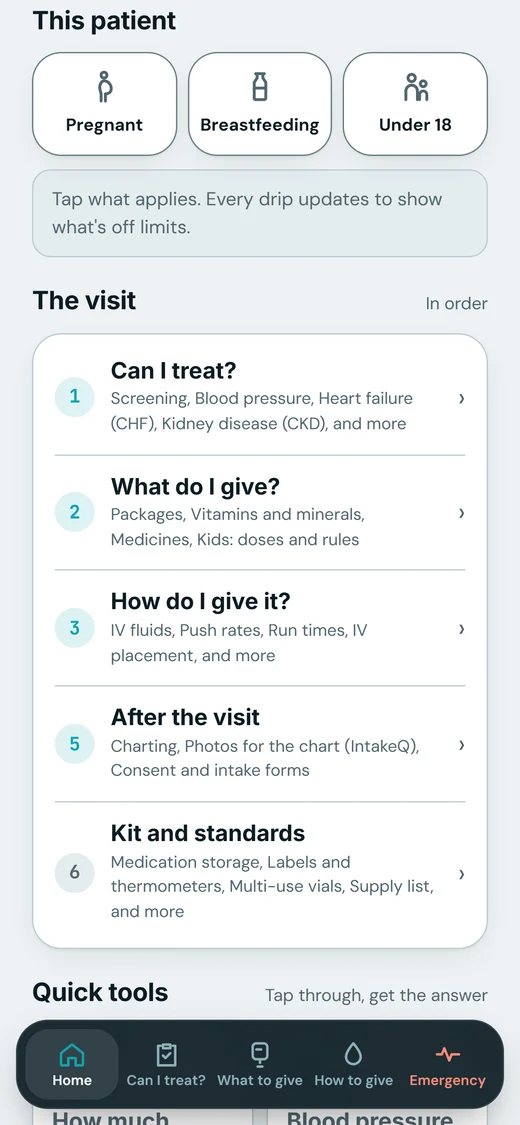
Patient switches
Flip one switch. Every drip updates.
Pregnant, breastfeeding or under 18: the nurse taps what applies, and every drip updates to show what is off limits. Shown on a demo company, Saguaro Mobile IV.
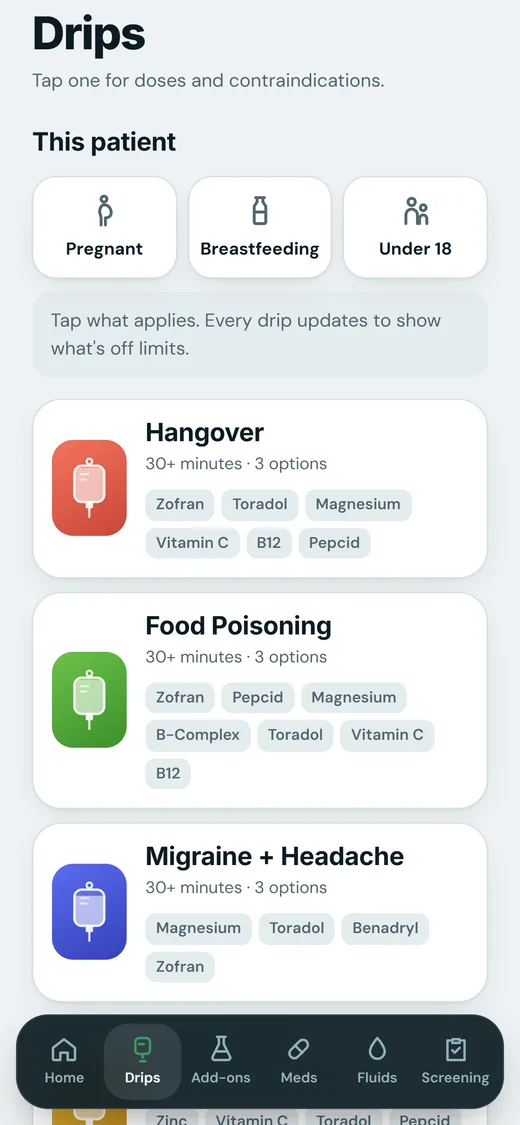
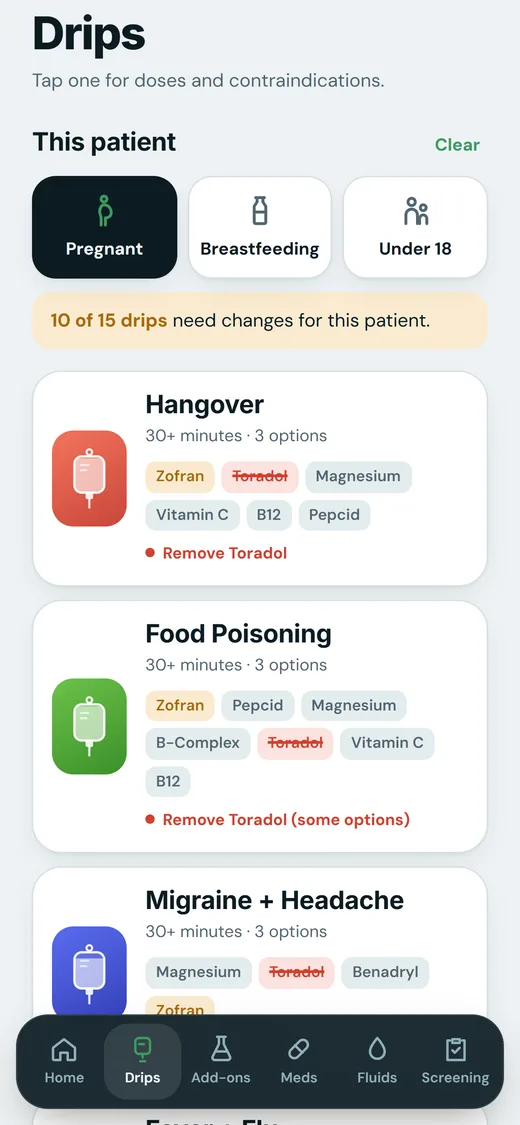
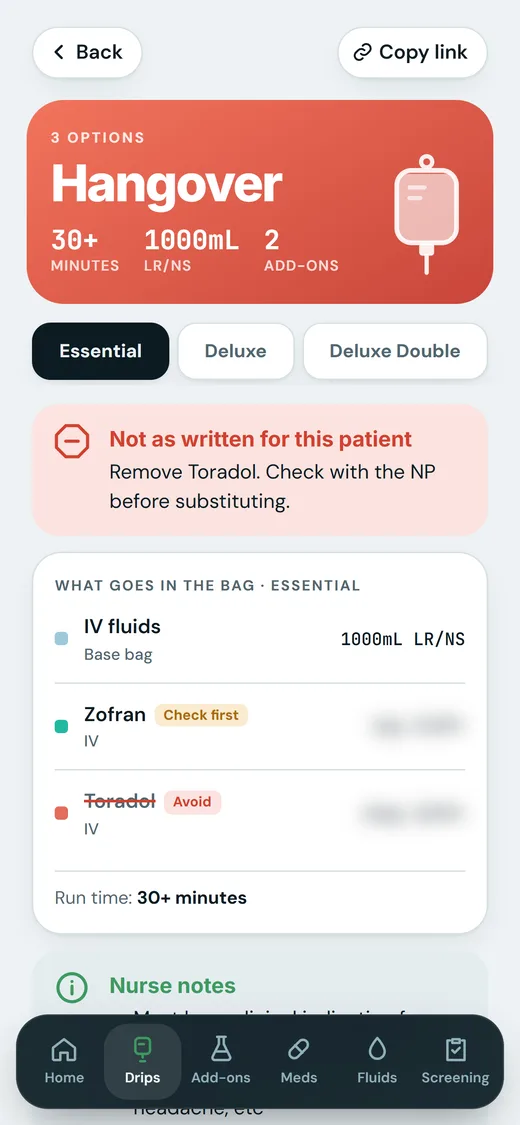
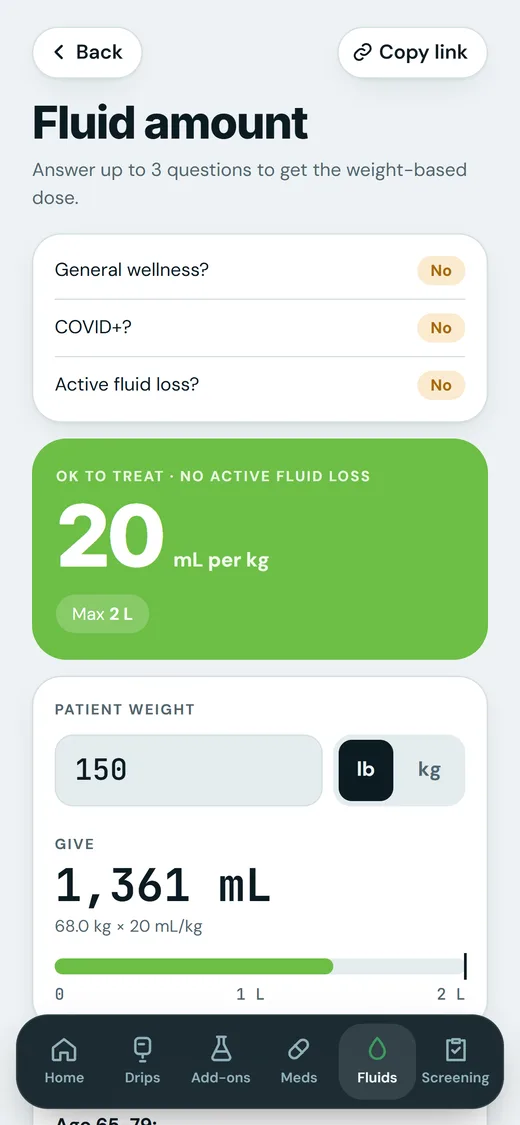
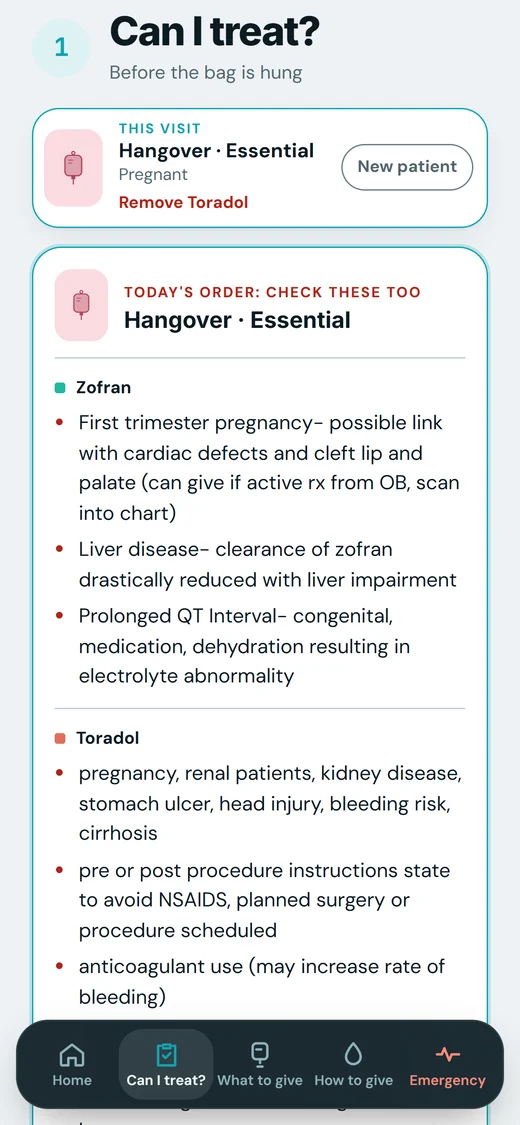
On a house call
Pick the drip. The book follows it.
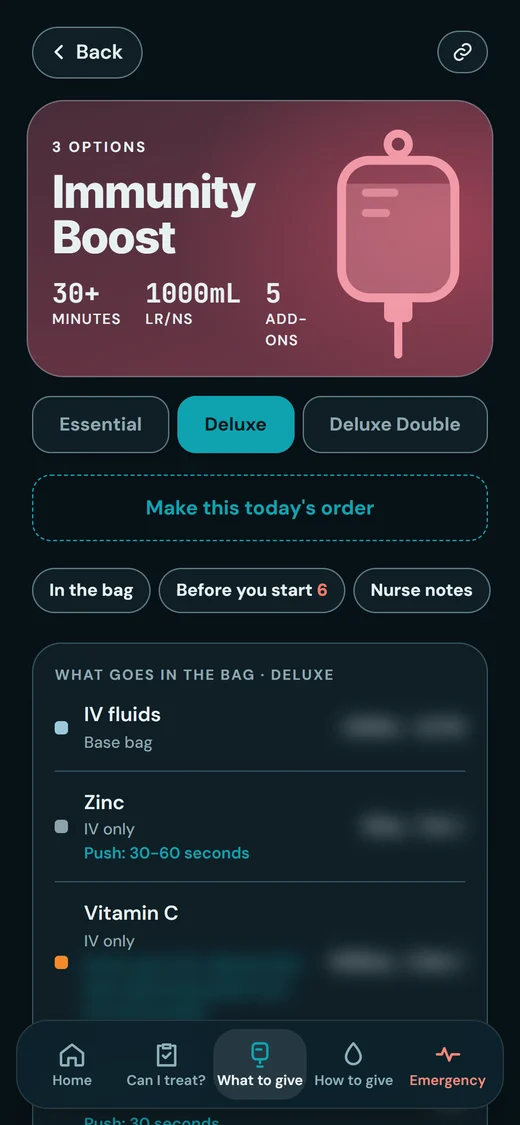
On any drip, the nurse taps Make this today’s order. From then on the whole book is about this visit, until she taps New patient.
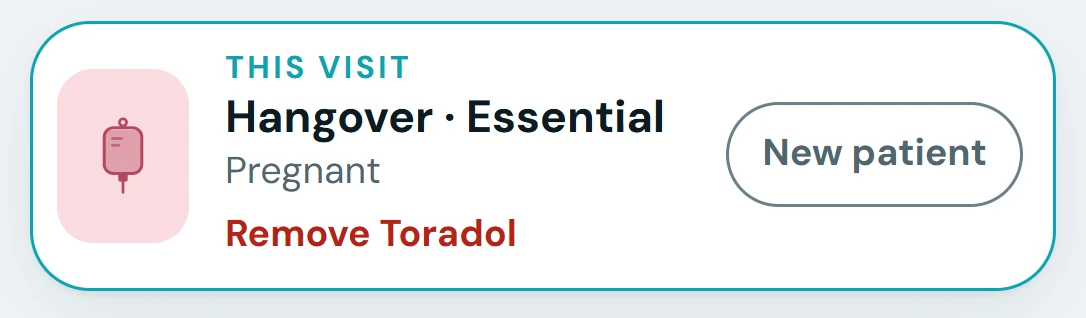
- Can I treat? adds the checks for that drip, under “Today’s order: check these too”.
- How do I give it? shows its fluid, run time and push rates.
- Every page shows the order at the top, so she never loses her place.
- A patient switch that changes the order says so on the bar, right away.
- If your medical director has an approval template, the request to the nurse practitioner is laid out in it, with the order and the weight filled in, and copied in one tap.
- New patient clears it all: the order, the switches, the weight. Nothing is saved.
Where the words come from
Your medical director’s words, not ours.
The book is built from your medical director’s protocols: the partner medical team’s, or your own. Anything their notebook doesn’t cover goes to them as a question.
1,861
lines in one client’s protocol notebook. Every one is accounted for: in the book, or kept out as a business page.
- Your medical director
Writes the protocols.
In the notebook or document they already keep. That is where we start.
- Our team
We build your book from it.
Their wording, doses and limits, as written. We fix plain spelling slips only, never one that could change a dose, a limit or who can be treated. Prices, payments and team chat stay out.
- Our team
Anything unclear goes back as a question.
If two pages disagree, we never pick one. Your medical director gets a short list on a page of their own: what changed, what to answer, what to approve.
- Your medical director
Answers.
Their answers go into the book, and a note that only explains something is added in their own words.
- Your nurses
Open it at the door.
The same book on every nurse’s phone, in your brand. When a protocol changes, we update it at the same address every nurse already uses.
Medical services, including medical direction, protocols and good faith exams, are provided by independent licensed providers, not by OMG Marketing. OMG Marketing does not practice medicine.
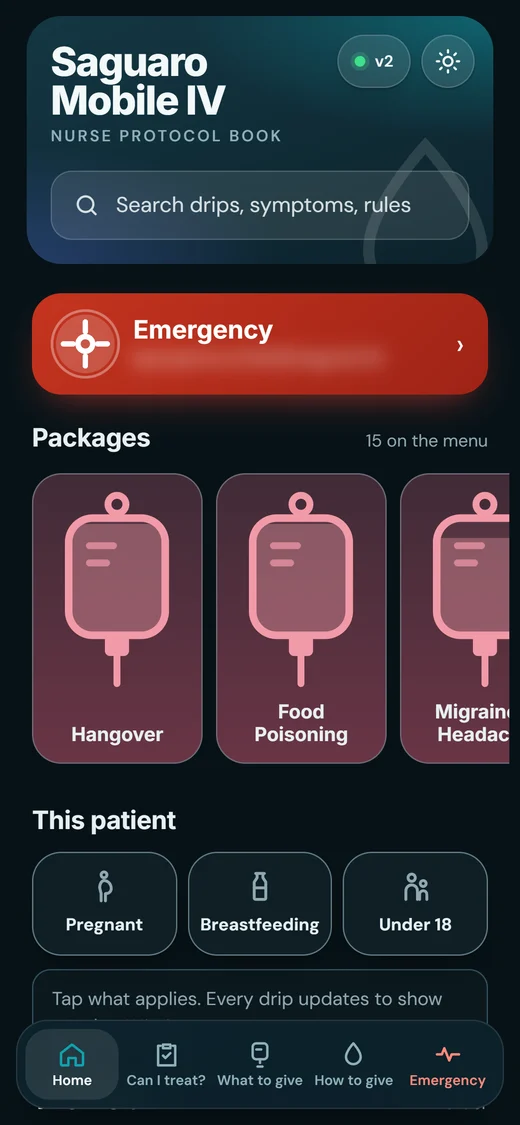
Your brand on it
Their book looks like your company.
Each book is dressed in its company’s own look, taken from its website. Shown on a demo company, Saguaro Mobile IV.
- Your logo, colors and type, the way your website uses them.
- Bag photos from your own website on the drips they match.
- Your icon on her home screen. She adds the book like an app.
- Light or dark, one tap, and her phone remembers it.
- On a computer too. From laptop size up, a sidebar holds every place and every drip.
- A link for every page, so one protocol can be sent to a nurse in a message.
How it connects
With the nurse, on every visit.
The partner medical team clears the patient, DripReady keeps the nurse ready, and the Protocol Book is what she reads at the door. Each step has its own page.
Questions
The Protocol Book, answered.
Who writes the protocols?
Your medical director: the partner medical team’s, or your own. The book is built from their protocols. OMG Marketing does not practice medicine.
Do you change anything they wrote?
We never change a dose, a limit or a warning, and we fix only plain spelling slips. If something looks wrong, or two pages disagree, it goes back to your medical director as a question, and the book follows their answer.
Our protocols are in OneNote or a Word file. Is that a problem?
No. That is where we start. We build the book from the notebook or document your medical director already keeps.
What happens when a protocol changes?
Your medical director tells us, and we update the book at the same address your nurses already use. There is no new file to send round.
Why are the doses blurred?
The medicine and vitamin doses on the demo drip pages are blurred for this website. In the book itself, every dose is there for the nurse.
What changes when a patient switch is on?
Every drip updates: what to remove is struck out, and a drip that is not as written for this patient says so, with what to check first.
Is anything about the patient saved?
No. A weight typed into the fluid calculator, the screening answers and the approval request are kept only while the book is open, and New patient clears them. Nothing is saved or sent.
Do nurses need an app from the app store?
No. The book opens in the phone’s browser, and she can add it to her home screen with your icon on it.
Can a nurse practitioner use it on a computer?
Yes. From laptop size up, the bottom bar becomes a sidebar with every place in the book and every drip.
Is that a real company?
No. Saguaro Mobile IV is a demo company made for these pictures.
Let’s grow yours.
Tell us where you are and where you want to be. We’ll show you what we’d change first.
Apply for your strategy Not open yet? The Mobile IV Therapy Academy is free →