Apply for your strategyApply

OMG Marketing / Software / Client Reporting

Client ReportingSee what every ad dollar brought back.

OMG Help DeskOMG clients only

Every OMG marketing client gets their own portal with their logo on it. Not a monthly PDF: a live view of what the marketing brought in, open any time.

Apply for your strategy

Client portal

Tap through the screens

A demo client with sample numbers. Tap a screen to jump to it, or watch the tour with sound.

The 12 months to Oct 14, 2026

Our own numbers, from the same records.

Added up across our clients from the same records your portal reads.

  • Google Ads managed

    $2.4M

    for 24 clients

  • Patients cleared

    12,599

    by 6 providers on the partner medical team, for 17 clients

  • Request to clearance

    2 min

    the median, across 12,299 timed clearances

Our dispatchers sent 13,238 visits in the same 12 months

Page by page

Your portal, one question per page.

The menu runs in the order an owner thinks: am I getting found, are my patients looked after, am I making money. Every page opens with one plain sentence that answers its question, then the numbers behind it.

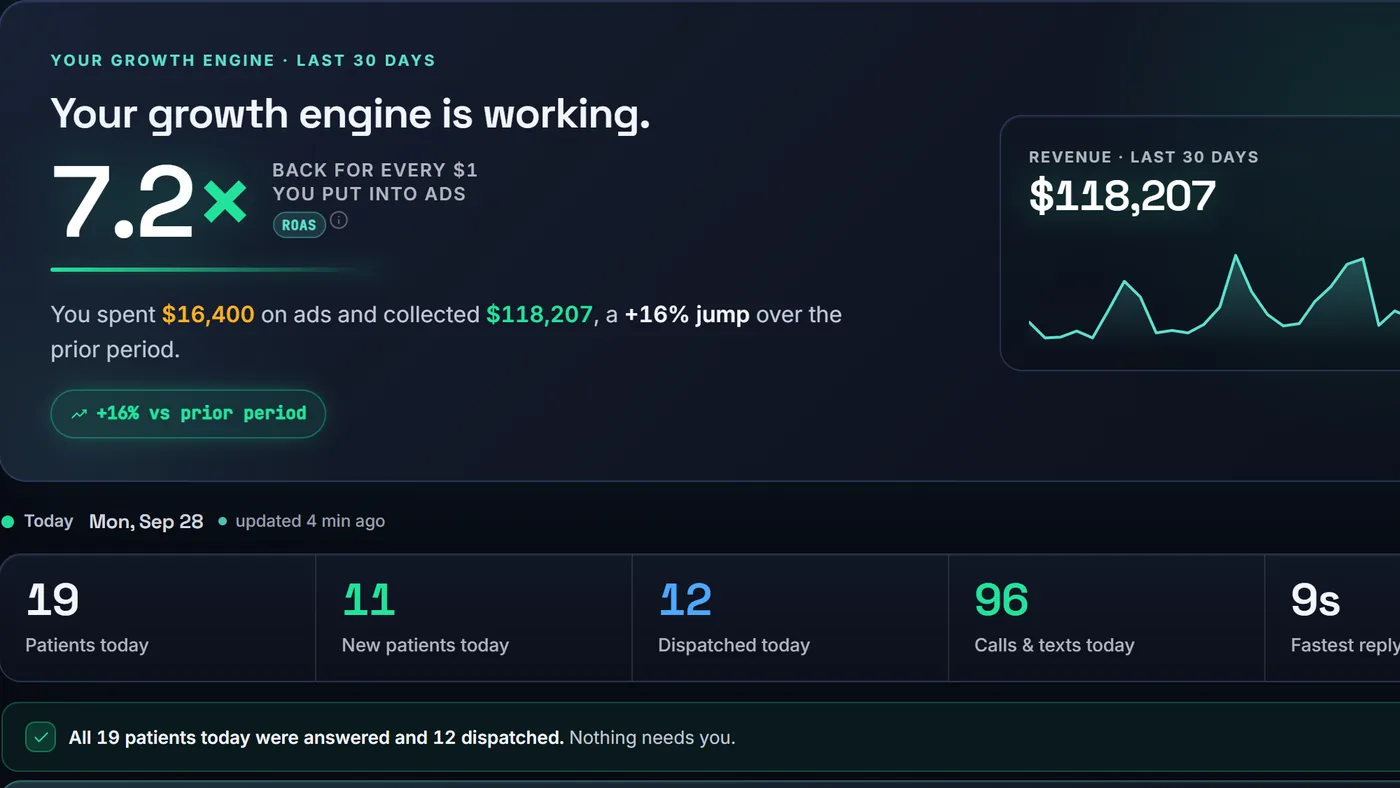
The portal's home page on a demo client: dollars back for every dollar in ads, revenue for the period, and today's patients, dispatched visits, calls and texts

Overview · Home

Is my marketing paying off?

One number first: how many dollars came back for every $1 you put into ads, next to what you collected. Under it, today's patients, new patients, dispatched visits, calls and texts, and the fastest reply, updated as the day goes.
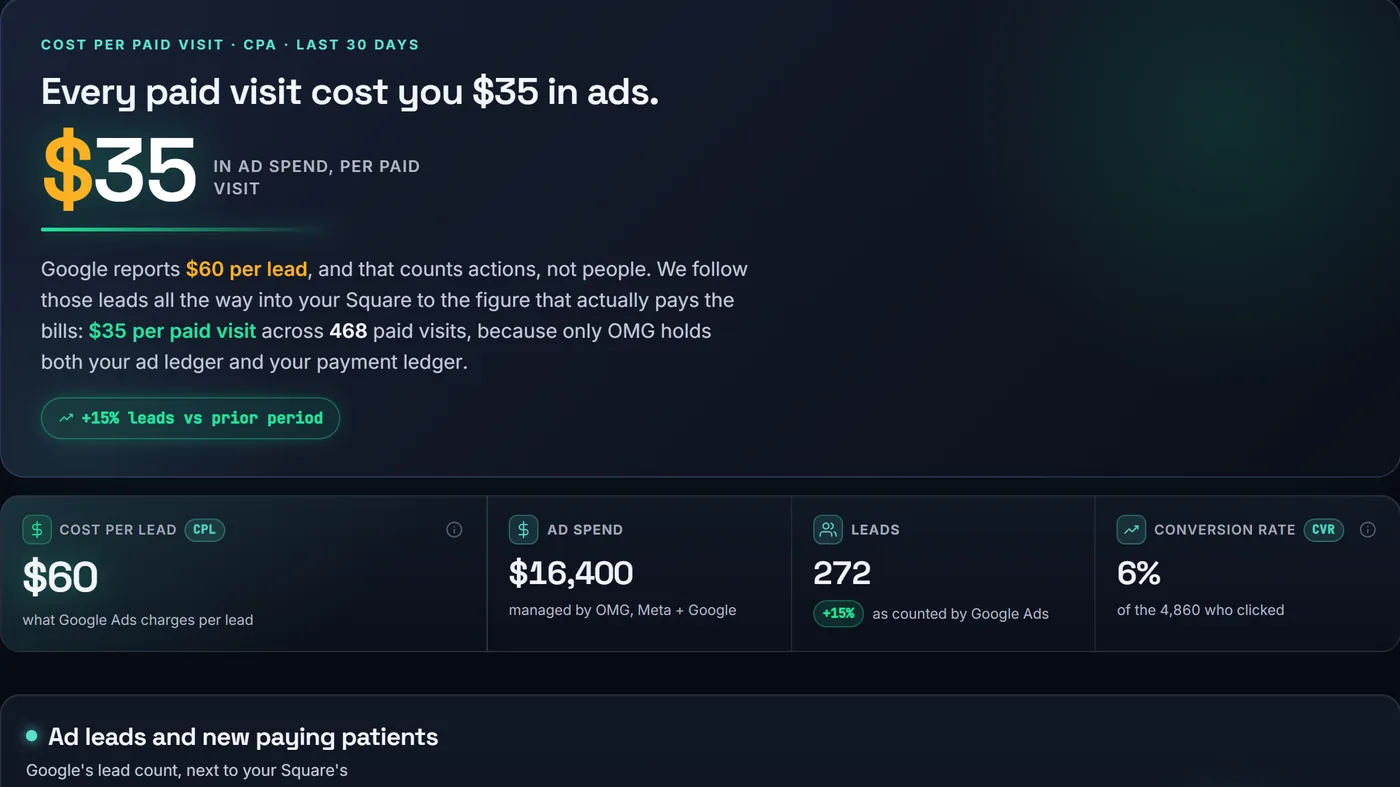
The advertising page on a demo client: what each paid visit cost in ads, cost per lead, ad spend, leads and conversion rate

Marketing · Advertising

What did a paying visit cost me?

Google counts leads. Your Square counts paid visits. Because we run your ads and your portal reads your Square, this page puts the two side by side: what each paid visit cost you in ads, by campaign and by city.

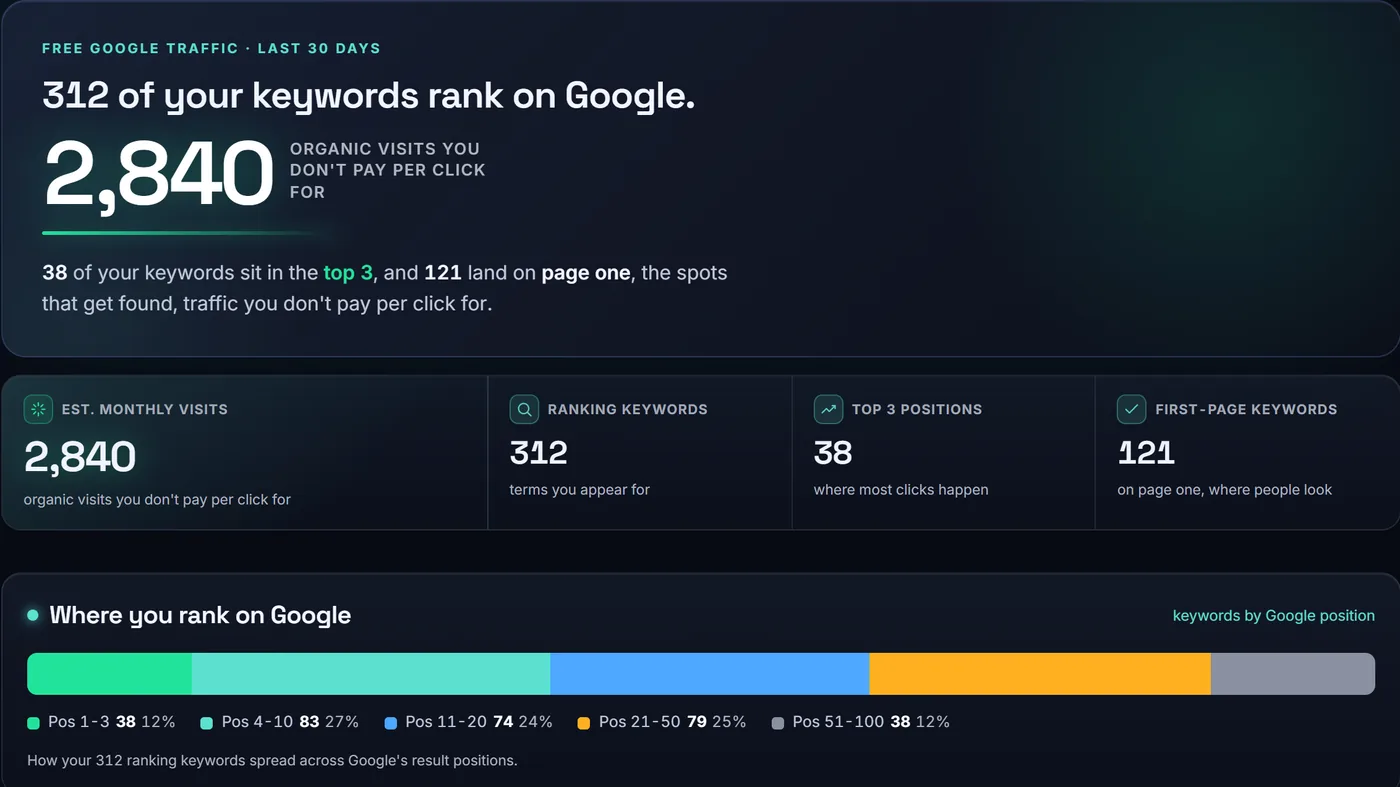
The SEO page on a demo client: keywords ranking on Google, top three and page one counts, free monthly visits, and where the keywords rank

Marketing · SEO

Am I showing up on Google?

How many searches you show up for, how many sit in the top three and on page one, and the visits that brings in without paying per click. It also shows which searches are climbing.

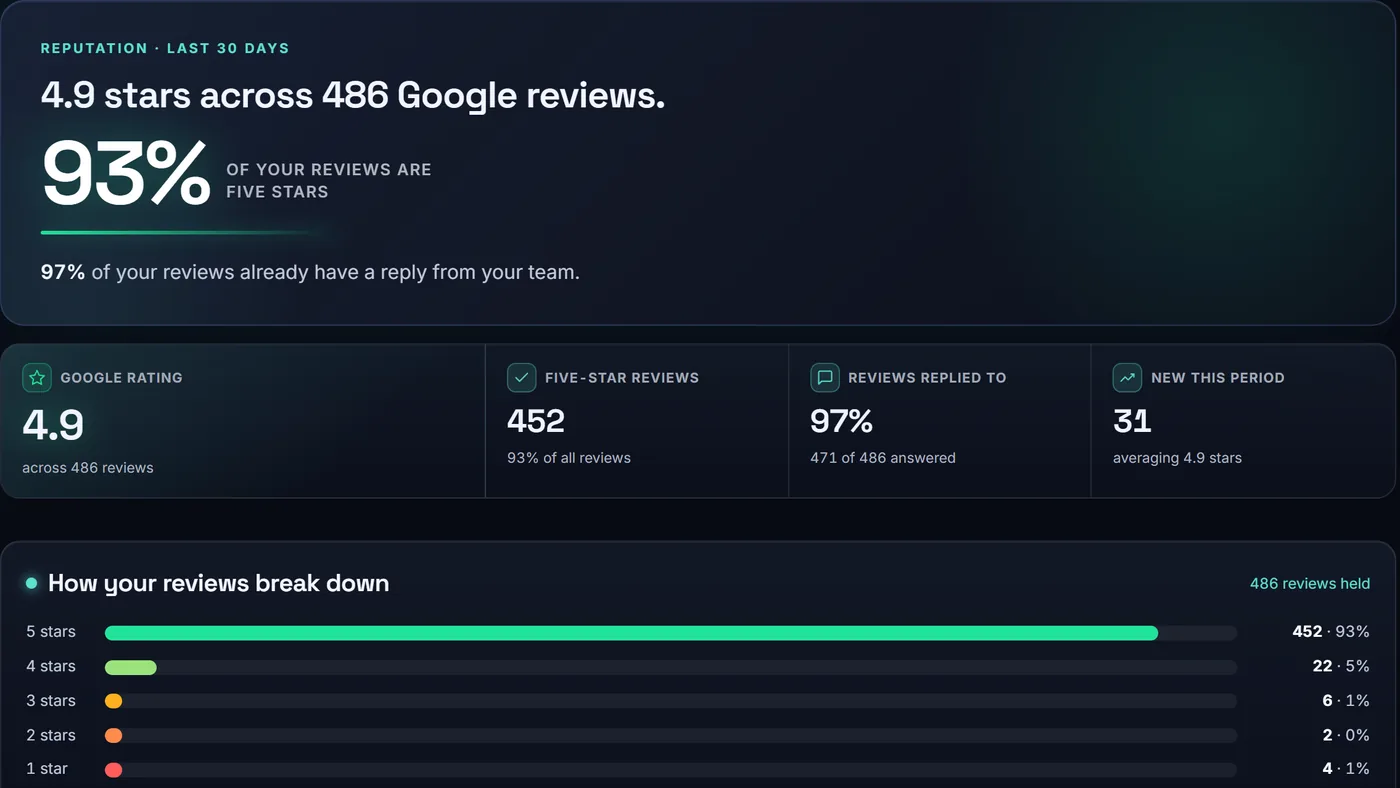
The reviews page on a demo client: Google star rating, share of five-star reviews, replies, and the breakdown by stars

Marketing · Reviews

What are patients saying?

Your Google star rating, how your reviews break down by stars, how many have a reply from your team, and every recent review with its reply.

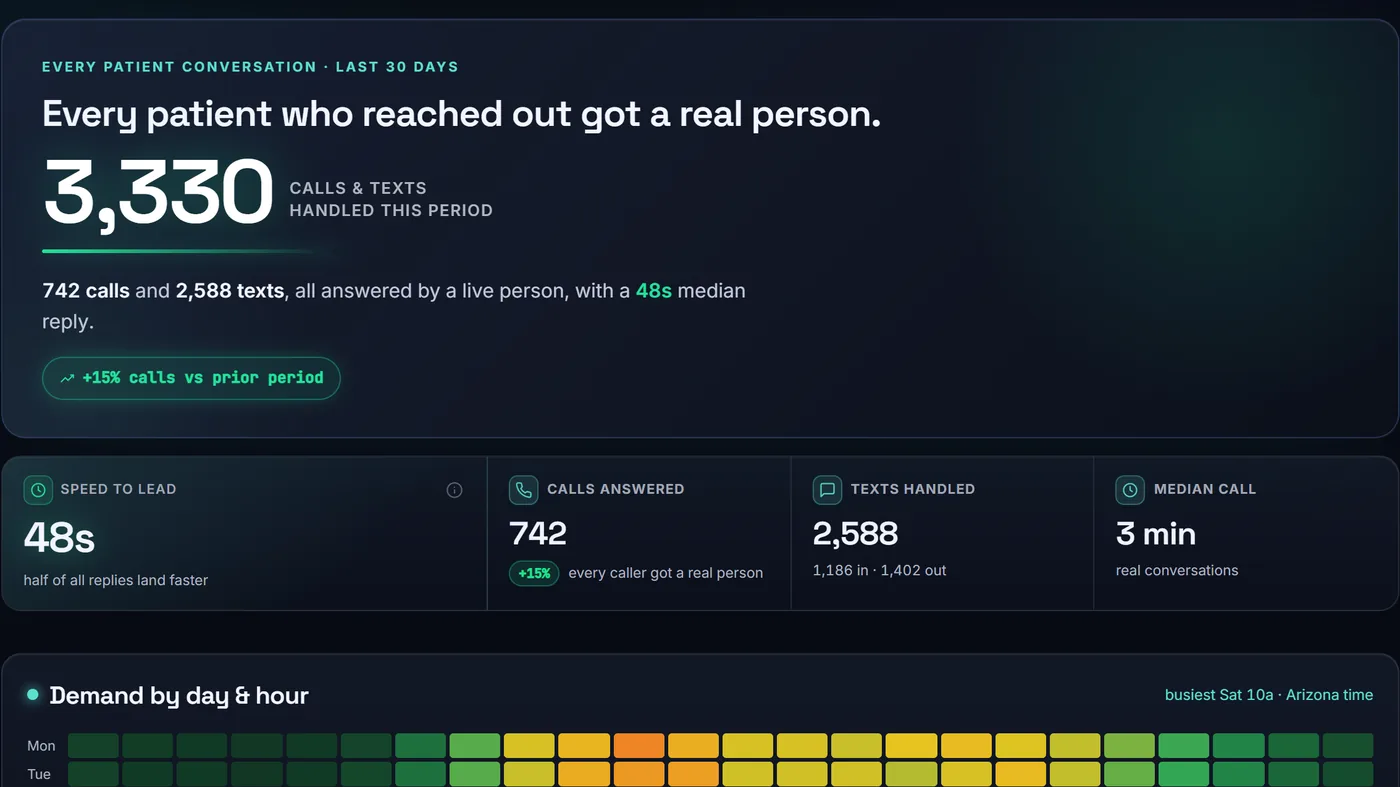
The calls and texts page on a demo client: calls answered, texts handled, reply speed, and a chart of the busiest days and hours

Patients & visits · Calls & texts

Did every patient reach a real person?

Every call and text, how fast it was answered, and when your patients reach out, by day and by hour, so you know your busiest times.

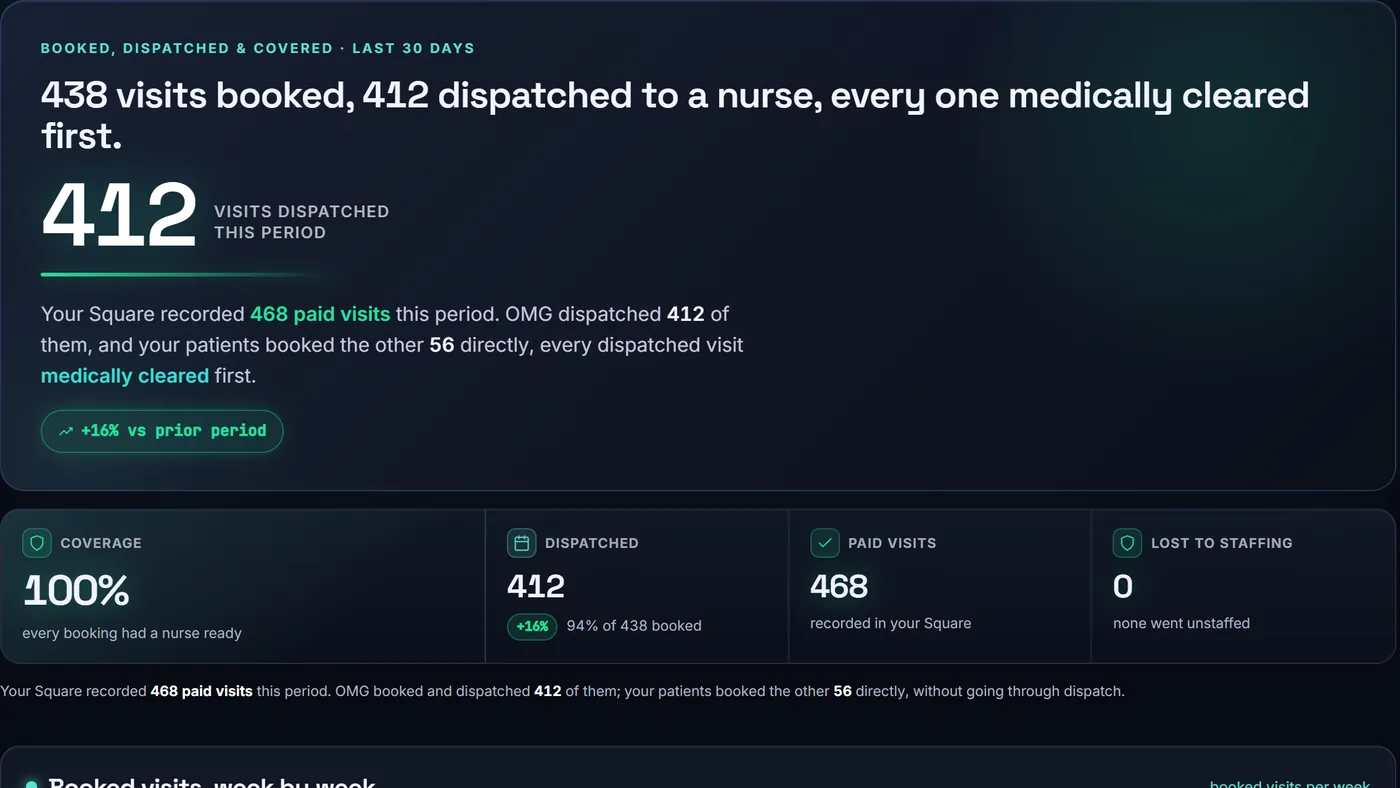
The visits page on a demo client: visits booked, visits dispatched to a nurse, nurse coverage and paid visits

Patients & visits · Visits

How many visits went out?

Visits booked, visits sent out to a nurse, and nurse coverage, week by week, next to the paid visits your Square recorded.

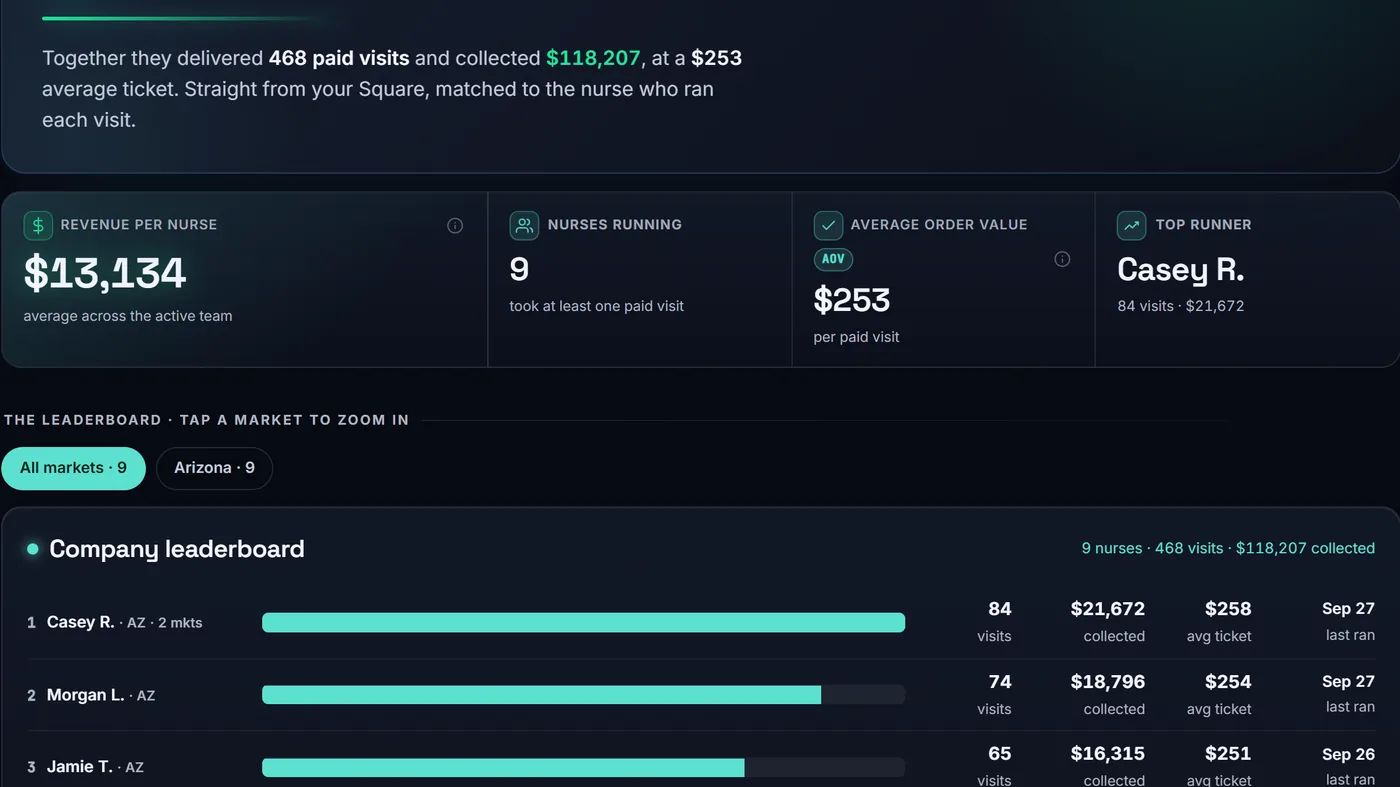
The nurses page on a demo client: revenue per nurse, nurses running, average order value, and a leaderboard of nurses by visits and money collected

Patients & visits · Nurses

Who on my team runs the most?

Which nurses run the most visits and bring in the most money, matched to your payments, on a leaderboard you can narrow to one market.

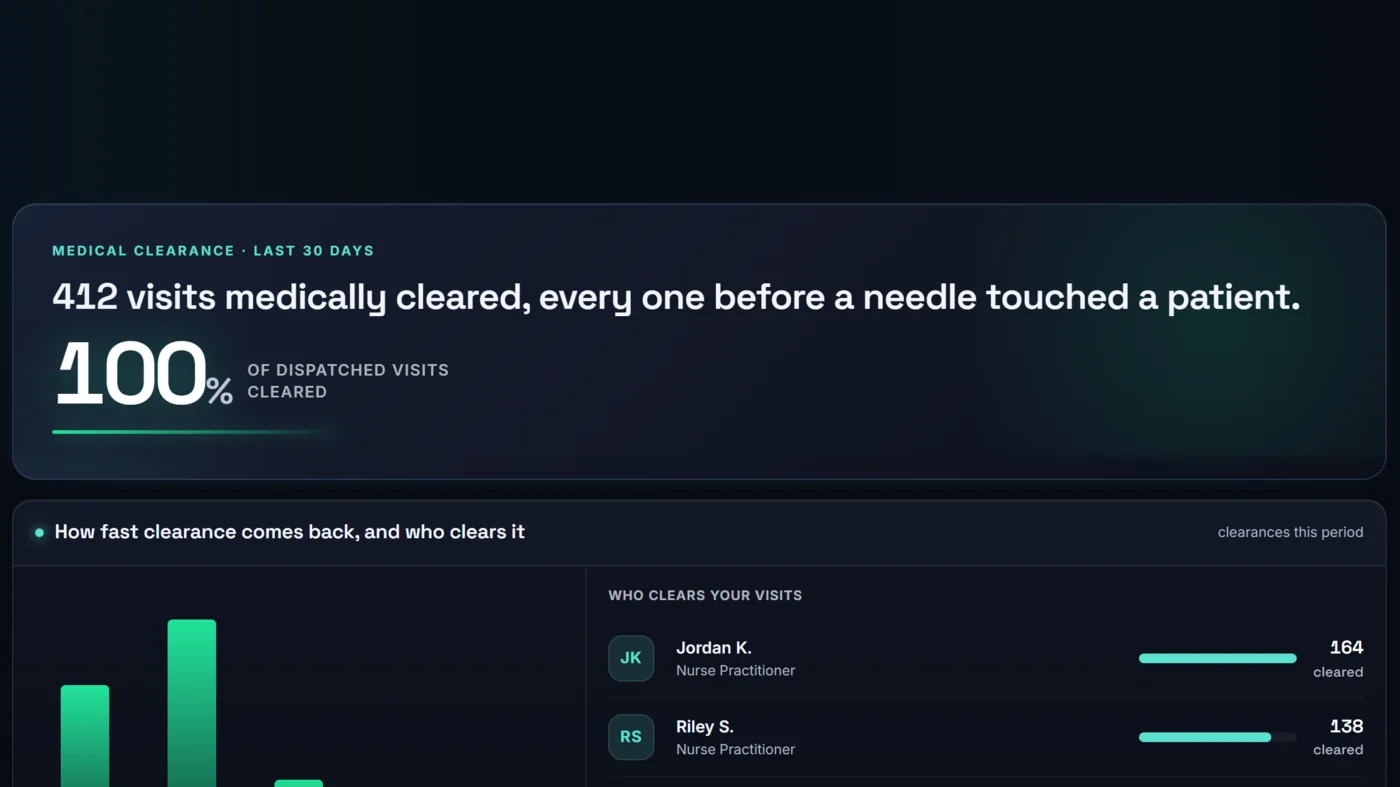
The compliance page on a demo client: how many visits were medically cleared before treatment, and which providers cleared them

Patients & visits · Compliance

Was every patient cleared first?

How many visits were medically cleared before treatment, the median time to clearance, and which providers on the partner medical team cleared them.

How clearance works
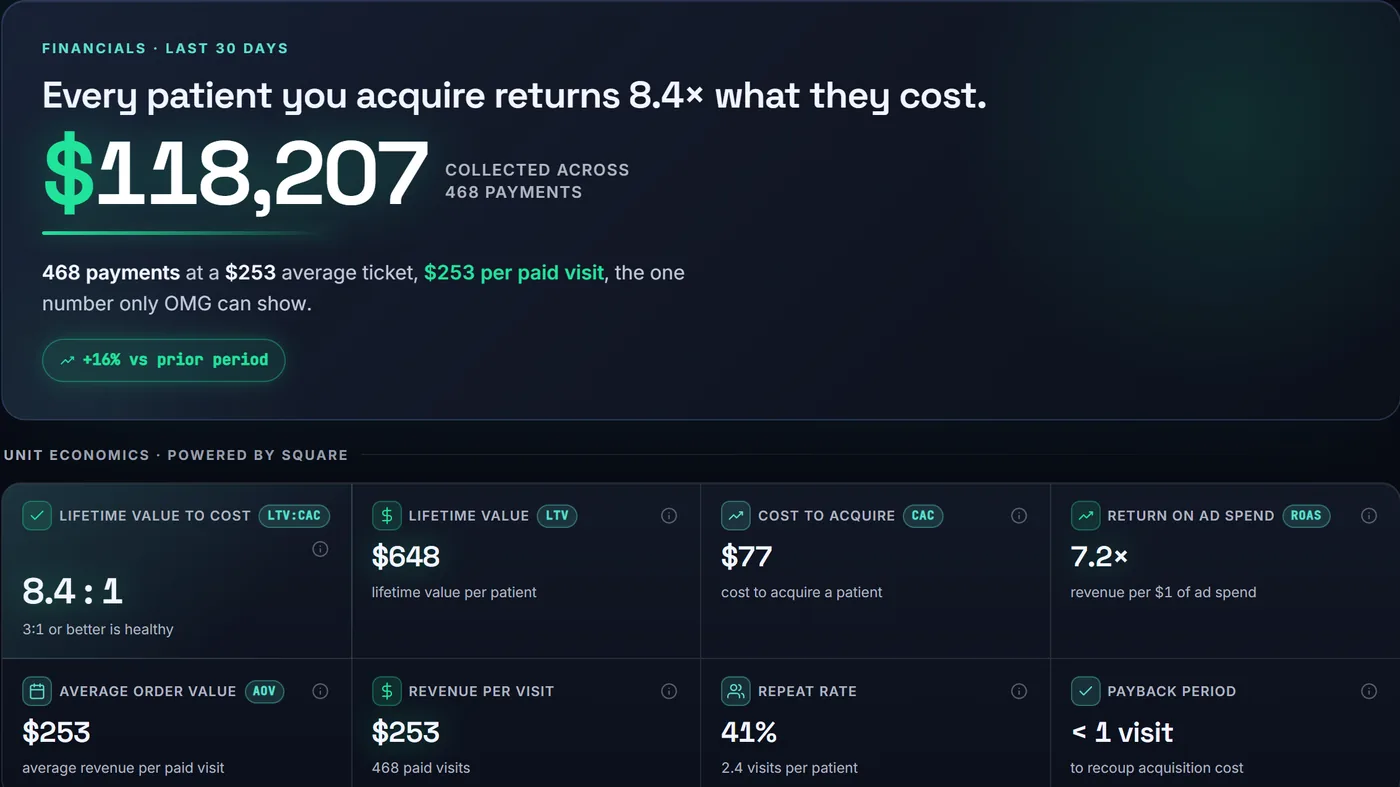
The financials page on a demo client: money collected, lifetime value, cost to acquire a patient, return on ad spend and payback

Money · Financials

Am I making money?

What you collected, the average ticket, what a patient is worth over time, what it costs to win one, and how many visits it takes to earn that back. Built on your Square.

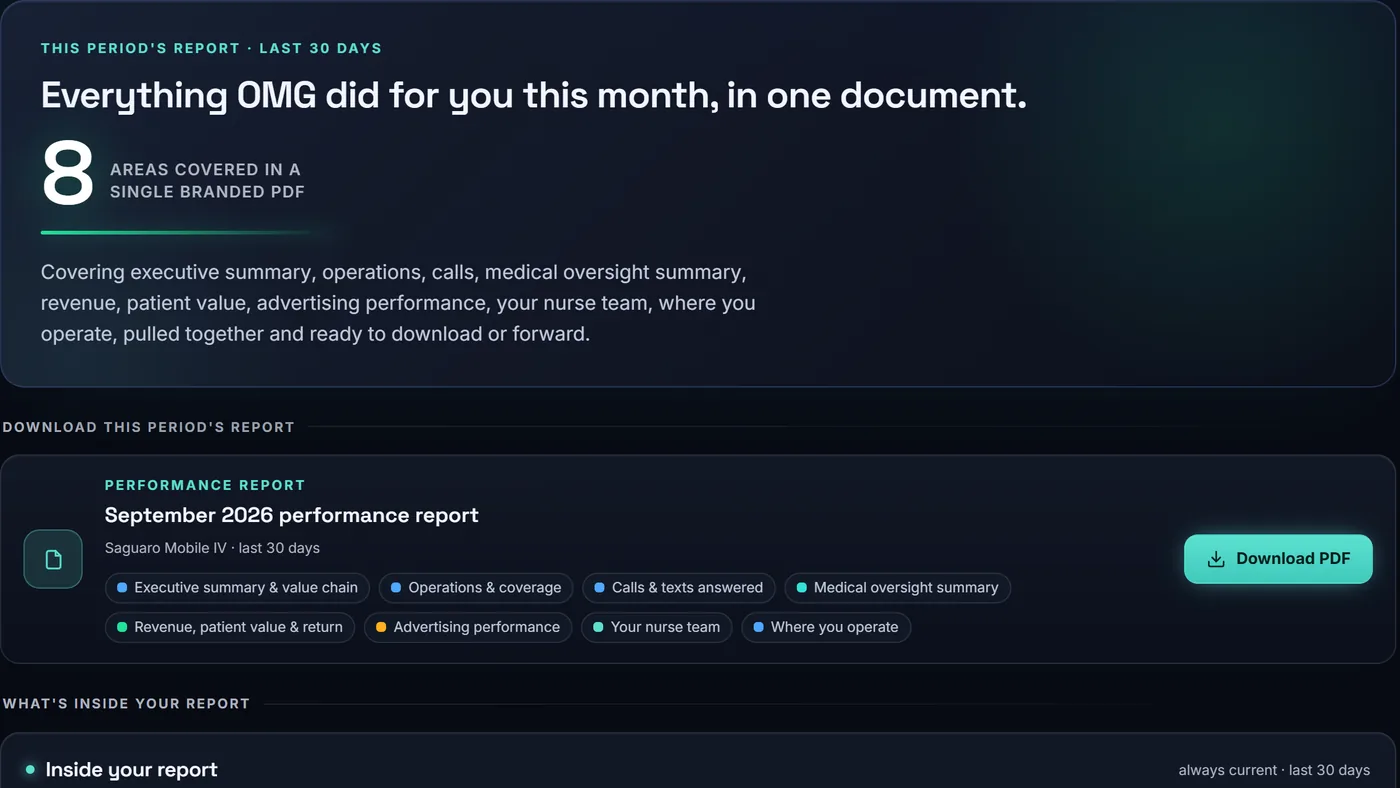
The reports page on a demo client: this period's branded performance report and a Download PDF button

Reports

Can I take this to my partners?

One click turns the period into a branded PDF: the summary, operations, calls, clearances, revenue, advertising, your nurses and where you operate, ready to print or forward.

Also in the menu: Hiring, the nurses ready now and on the way (from DripReady), and Locations, each city's visits and ad cost per visit.

The whole chain, in one place

From the ad dollar to the revenue.

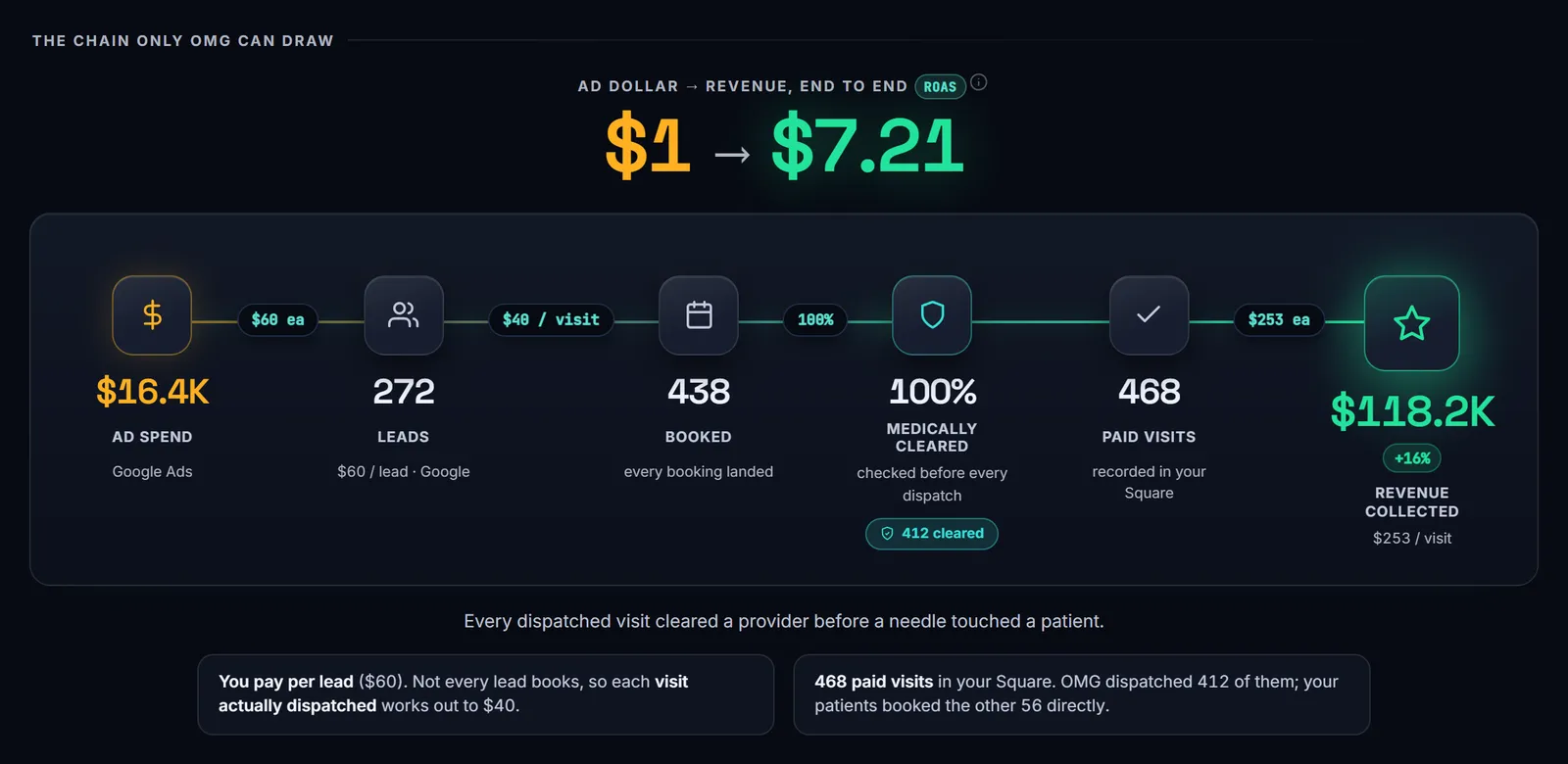
An agency report usually stops at the ad. We run the ads, the phones and the dispatch, so your portal follows the patient the whole way: the ad, the lead, the booking, the medical clearance, the paid visit and the revenue.

Client portal · Home

The chain on a demo client's portal: ad spend, leads, booked visits, medically cleared visits, paid visits and revenue collected, step by step, with what each step cost
A demo client, Saguaro Mobile IV, with sample numbers.

Where each number comes from

Ad spend, clicks and leads
Your Google Ads and Meta accounts, which we manage. Leads are counted the way Google Ads counts them.
Calls and texts
The calls and texts our team answers for you.
Booked and dispatched visits
Our dispatch team's own records.
Medical clearances
Each exam request your nurses send the partner medical team, and the provider who answered it.
Paid visits and revenue
Your Square, once you connect it.
Reviews
Your Google reviews, with your team's replies.

Clearance · partner medical team

Every patient cleared, every clearance counted.

Every patient is cleared ahead of treatment by a licensed provider from the independent partner medical team, which covers 12 states. Your portal keeps the tally of those clearances, for whatever dates you pick.

  • Counted from your nurses’ requestsYour portal counts each exam request your nurses send to the partner medical team for a patient.

  • Who cleared your patientsThe providers on the partner team who cleared your visits, each with how many they cleared.

  • Speed, shown as the medianThe time from request to clearance is the median, the same measure on this page and in your portal.

In your portal

The totals

How many visits were cleared, the median time to clearance, and which providers cleared them. Counts and speed, not each patient's exam.

Sent to you

Each exam's record, as its own PDF

The exam records come to you as a set, one PDF per exam, for the patient's chart.

How the good faith exam works

Made for an owner

No agency jargon to decode.

Built to be read by the person who owns the business, on a computer or on a phone.

  • Plain words for every short termROAS, CPA, LTV and the rest each come with a short explanation and the sum behind it.
  • Any dates you likeToday, the last 30, 60 or 90 days, last month, or your own dates. Every page follows the range you pick.
  • Up to date through the dayToday's numbers update as the day goes.
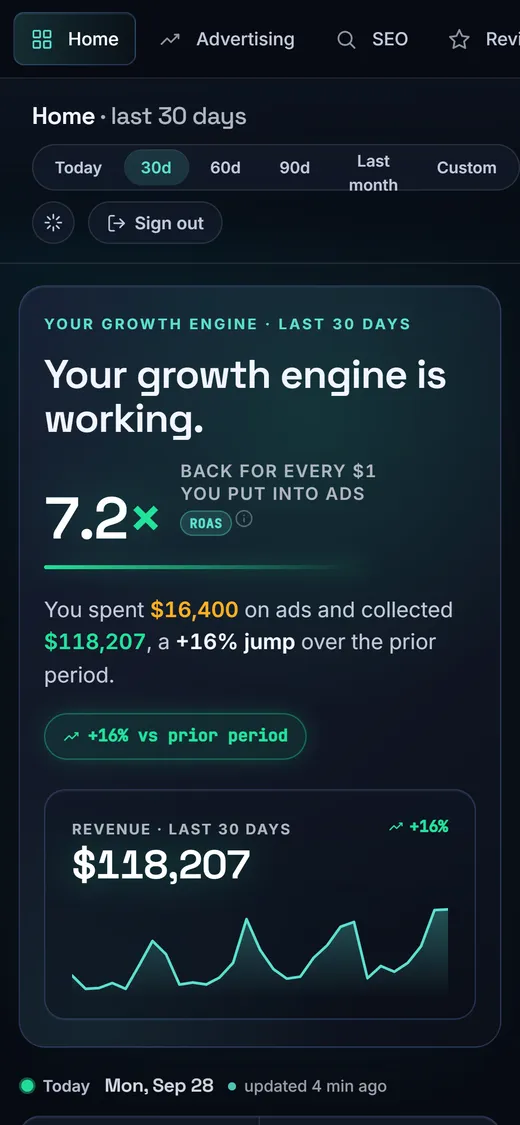
The client portal's home page on a phone: what every ad dollar brought back, and revenue for the last 30 days, on a demo client
  • Your logo on itThe portal carries your business's own logo.
  • Only your businessEach login sees its own business and nothing else.
  • Totals, never patientsThe portal shows totals only. No patient information is shown.

Getting set up

Set up once. Then it fills in.

Two steps are ours, two are yours, and one of yours takes two clicks.

  1. 1
    Our team

    Your login, with your logo

    We set up your portal with your logo, and a login for each person who should see it, like a business partner.

  2. 2
    You

    Connect Square

    If you take payments through Square, connect it in two clicks: log in and approve. That is where paid visits and revenue come from.

  3. 3
    Our team

    It fills in from our work

    Each page fills in from what we already do for you: the ads we run, the calls and texts we answer, the visits we dispatch. A page for a service you don't use with us explains that service instead.

  4. 4
    You

    Open it any time

    Pick a date range, read the pages you care about, and download the report when you want it on paper.

Questions

Client Reporting, answered.

Is this a monthly report?

No. Your portal is live and open any time. When you want something on paper for a partners meeting, one click makes a branded PDF of the period you picked.

Can I get the portal without OMG’s marketing?

No. Client Reporting is for OMG clients only.

Where do the numbers in my portal come from?

Your ad accounts, which we manage; the calls, texts and visits our team handles; the partner medical team’s clearances; and your Square, for paid visits and revenue.

How do paid visits and revenue get in?

From Square. If you take payments through Square, you connect it once, in two clicks: log in and approve.

Can my business partner have a login?

Yes. We can set up more than one login for your business. Each login sees only your business.

Does it show patient information?

No. The portal shows totals only. No patient information is shown.

Does it show each patient’s exam?

No. It shows how many visits were cleared, how fast, and which providers cleared them. Each exam’s record comes to you as its own PDF. The exams are done by the independent partner medical team. OMG Marketing does not practice medicine.

Can I choose the dates?

Yes: today, the last 30, 60 or 90 days, last month, or any dates you pick. Every page follows the range you choose.

Is that a real client in the film?

No. The films and screens show a demo client, Saguaro Mobile IV, with sample numbers. Your login shows your business.

Where do the numbers at the top of this page come from?

From our client portal, across all our clients, for the 12 months to October 14, 2026. The time to clearance is the median.

Let’s grow yours.

Tell us where you are and where you want to be. We’ll show you what we’d change first.

Apply for your strategy Not open yet? The Mobile IV Therapy Academy is free →